Knowing how many people visit your website is useful, but knowing how many of them actually take action and make the call, send the email, fill out the form, or click the “Book Now” button is what actually pays the bills.
Beacon’s new Lead Tracking feature connects those who visit your site with their actions. It shows you what visitors do on your site and where each visitor came from first: Google, Facebook, Instagram, a direct visit, or an AI assistant like ChatGPT. It shows you where your lead activity comes form so you know where to invest your time and efforts.
If you’ve been investing in SEO or AI visibility, this is where you see whether it’s turning into real inquiries.

What you’ll be able to monitor with Beacon’s Lead Tracking
At the top are four tiles for the last 30 days:
- Phone clicks: visitors who clicked on your phone number to give you a call.
- Email clicks: visitors who clciked your email address to send you a direct email.
- Form submissions: contact or inquiry forms submitted
- Booking clicks: visitors who clicked through to book to open a 3rd party booking tool, including finished calendar bookings or opened up your pet software link to login and schedule pet care/create an account.
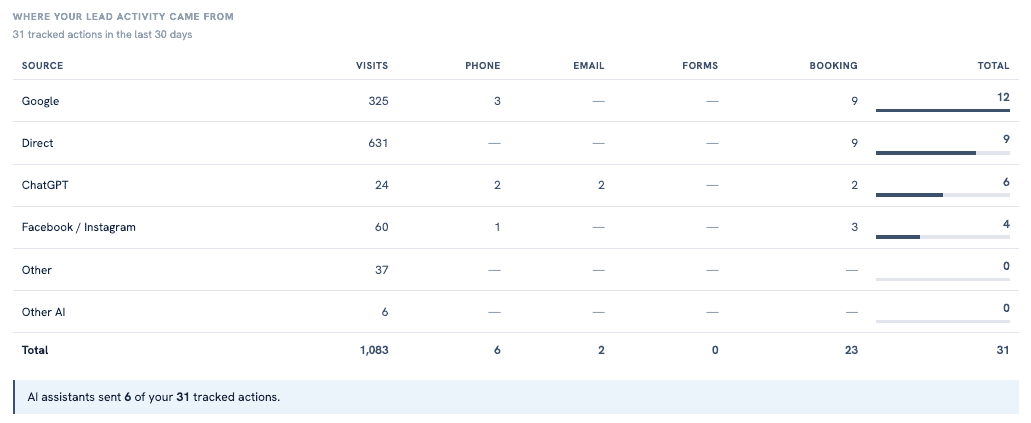
Below the tiles, a source table lists every place your traffic came from, with visits next to the calls, emails, forms, and bookings each source produced.
That side-by-side view is the useful part: a source can send plenty of visitors and few leads, while a smaller one quietly sends people who act. For example below, ChatGPT sends less visits, but you can see those who come from ChatGPT are more likely to take action.
A highlighted line under the table tells you how many of your tracked actions came from you’re working on getting recommended by tools like ChatGPT, that’s your running proof that it’s working.
Spot trends and your best converting pages
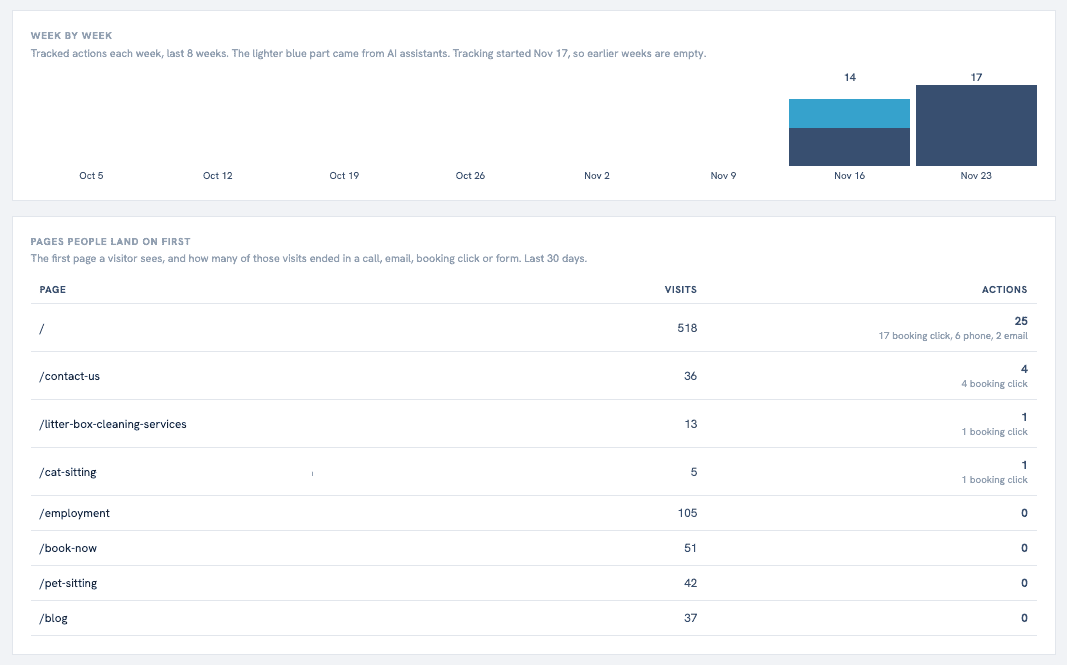
The week-by-week chart shows tracked actions for the last eight weeks, with the portion that came from AI assistants shaded in a lighter blue. With small numbers, one quiet day tells you very little. A pattern over several weeks tells you much more.
The pages table shows the first page each visitor saw and how many of those visits ended in a call, email, booking click, or form submission. This answers a question most business owners never get to ask: which pages actually bring in leads? Your homepage may be doing the heavy lifting, while a page that gets steady traffic, like a careers or blog page, produces no inquiries at all. Once you know that, you know where to improve a call to action or add a clearer booking button.
Want to dig deeper? Ask your own AI. Beacon now has a connector that lets you connect your own Claude or ChatGPT to read the data from your Beacon account, so you can ask questions about your data in plain English instead of hunting through tabs. You can get real answers based on your actual data, not generic information from an AI’s training. For example, you can ask your AI which pages are generating traffic but not converting, and what you should do to improve conversion on them.
It’s read-only, so it can look at your data but can’t change anything, and it’s available on the Pack plan.
To set it up, open Connectors under Tools in Beacon, copy your private link, and add it to Claude or ChatGPT.
Then try questions like:
- “How is my website traffic trending, and how much comes from AI tools?”
- “What’s my number-one move this week?”
- “What’s still on my action plan, and what should I tackle first?”
Think of it as an AI marketing analyst that already knows your numbers!
How does it work?
Beacon’s Lead Tracking runs on a small tracking script added to your website. Once it’s installed, Beacon checks your homepage for it and shows a green “Script found” message. Once Beacon confirms it can receive the data, is starts monitoring and clicks start appearing within a day of the first click. To see where each visit came from, Google Analytics also needs to be connected to your Beacon account in the “Settings” tab.
To confirm everything works, use the live view at the bottom of the page. Press start, then tap your phone number on your website in an incogneto tab. The last 30 minutes of phone clicks, email clicks, booking clicks, finished bookings, and form submits update right there. The live view shows what just happened, not where the visit came from. The source table fills in once Google Analytics finishes processing.
What to keep in mind
Lead Tracking is a directional guide, not a bookkeeping tool. A few things help you read it correctly:
- These are clicks, not confirmed bookings. The booking column includes finished Calendly bookings, but a click doesn’t guarantee a client or that the person created an account in your software after they clicked.
- Google Business Profile calls aren’t counted. Those calls happen inside Google, so they never reach your site.
- Facebook and Instagram numbers can run low. Their apps often hide where a visit came from.
- Tracking only counts from the day it’s installed and can’t show historical data. Visits cover the full 30 days, but actions don’t, so wait a full month before comparing the two.
- Look at weeks, not days. With small numbers, the pattern matters more than any single day.
The tracking script also adds a cookie to your website and records clicks on it. Privacy and cookie rules differ by country, state, and province, so have a lawyer review your privacy policy and cookie notice before you turn it on. Make sure your website has a cookie policy and privacy policy that cover this kind of tracking, and that visitors can see them.
See what’s working for your business
Stop guessing which marketing channels bring in clients. Log in to Barketing Beacon, open Lead Tracking under “Where You Stand,” and see which sources, and which pages, are sending you calls, emails, and bookings!
Not a Beacon user yet?! You can register your account here. Sign up before Dec 1st 2026 and get 30% OFF for 6 months with the code: BLACK30

Erika Godwin is the President of Barketing Solutions and the Co-Founder and CMO of ProPet Software, an industry-leading kennel management software. Erika has over 8 years of experience with WordPress and graduated from Elmira College in 2009 with a BS, Business Administration- Marketing and Management. View Erika’s Full Bio.